And how 10 principles I almost ignored ended up shaping every line of code.
My Downloads folder had become a graveyard. Docker installers from two years ago. Three copies of OperaGX. A 868 MB staging backup of a WordPress site I probably don’t need anymore. I knew what the problem was — I just didn’t want to manually go through 2,800 files to fix it.
So I built an AI agent to do it. Not a script. Not a one-shot prompt. An actual agent — one that reasons, uses tools, and loops until the job is done.
Before I started writing code, I listed the 10 things that make or break an agent. By the time I finished, every single one of those principles had shown up — either as code I was glad I wrote, or as a bug I had to fix because I hadn’t thought it through.
Here’s how they mapped to the real implementation.
1. Tool Design — The Agent Is Only as Good as Its Tools
The most important decision I made wasn’t in agent.py. It was in tools.py.
Each tool is a Python function paired with a JSON schema. The model never sees the source code — it only reads the description field to decide when and how to call each tool. That description is everything.
{
    "name": "suggest_deletions",
    "description": "Run a full cleanup analysis and return prioritised deletion
    suggestions grouped by category: temp files, old installers, archives, large
    media. Never reads file contents. Never suggests sensitive files.",
    ...
}
I ended up with five tools, each with a single clear responsibility:
list_directory— overview, metadata onlyanalyze_directory— breakdown by type, age, size, duplicatesfind_old_files— files untouched for N days, biggest firstsuggest_deletions— categorised cleanup opportunitiesconfirm_delete— the only tool that can change anything on disk
The rule I kept coming back to: if two tools overlap, the model will pick the wrong one at the wrong moment. Each tool does one thing. The descriptions say what, when, and — critically — what it will never do.
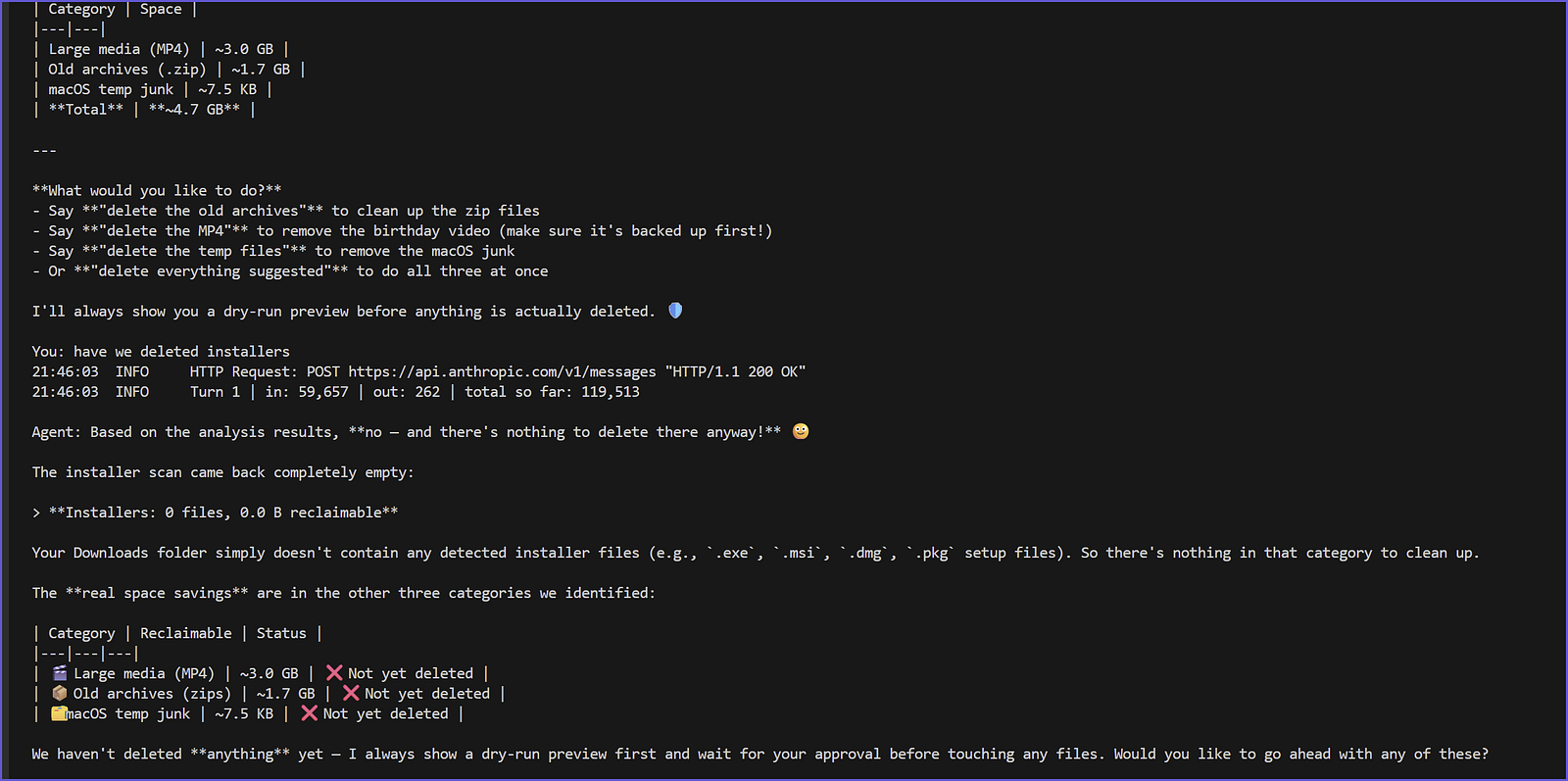
Here’s what a real analysis looks like. The agent scanned the full Downloads folder and surfaced the breakdown immediately:
2. Loop Exit Condition — Without a Cap, the Agent Runs Forever
The agent loop is a while True. That’s intentional — the agent should keep going until the task is done. But “done” needs to be defined, or a confused model will spin indefinitely and empty your API wallet.
MAX_ITERATIONS = 20 # safety cap — prevents runaway loops
for iteration in range(MAX_ITERATIONS):
    response = client.messages.create(...)
    if response.stop_reason == "end_turn":
        return "\n".join(text_parts), history  # model is done
# ... handle tool calls, loop again
return "Reached maximum iterations. Please try a more specific request.", history
Two exit conditions: the model signals it’s done (stop_reason == "end_turn"), or we hit the hard cap and return gracefully. The model never gets to run indefinitely. I learned this matters more than it sounds — on my first test with a large directory, the analysis tool returned so much data the model got confused and kept calling analyze_directory repeatedly. The cap saved me.
3. System Prompt — Be Explicit About What the Agent Must Never Do
A vague system prompt produces inconsistent behavior. I wrote mine like a contract, not a suggestion.
SYSTEM_PROMPT = """You are a file cleanup assistant. Your job is to help users
understand what's in their directories and safely reclaim disk space.
Rules you must always follow:
1. NEVER read file contents — use metadata tools only.
2. NEVER delete anything without first showing a dry-run preview.
3. NEVER suggest deleting files flagged as sensitive.
4. ALWAYS explain your reasoning in plain English before listing suggestions.
5. When suggesting deletions, group them by category and show how much space each group reclaims.
Your workflow for a new directory:
1. list_directory — get the lay of the land
2. analyze_directory — understand what's taking space
3. suggest_deletions — categorised cleanup opportunities
4. Present findings clearly, then ask the user what they'd like to do
"""
Two things worth noting: the numbered rules use NEVER and ALWAYS deliberately — the model takes strong language seriously. And the explicit 4-step workflow prevents the agent from skipping straight to suggestions without understanding the directory first. Without that workflow, it would sometimes call suggest_deletions before analyze_directory, which produced worse recommendations.
4. Memory Strategy — The Context Window Is the Agent’s Working Memory
Every message turn gets appended to history and sent in full with the next API call. That’s how the agent “remembers” what it just did — the context window is its working memory.
# Append this turn to history
messages.append({"role": "assistant", "content": response.content})
messages.append({"role": "user",      "content": tool_results})
This works fine for short tasks. But on a large Downloads folder, the initial scan returns thousands of file entries as JSON. That blob gets passed back on every subsequent API call, and the context blows up fast.
The fix was context compression — trimming older tool results while keeping the two most recent intact:
def _compress_history(history: list) -> list:
    KEEP_LAST_N = 2    # keep recent tool results in full
    MAX_CHARS   = 800  # truncate older ones to this length
    # ... find tool result turns older than the last N
    # ... truncate their content to MAX_CHARS
    # ... return the compressed history
This alone cut mid-session token usage by 50–70% on large directories. The model retained enough recent context to act correctly, without dragging along the full file listing from three turns ago.
5. Safety & Human-in-the-Loop — Nothing Irreversible Without Confirmation
This one I got right from the start, and I’m glad I did — because the agent actually deleted real files on my machine.
The safety lives in two places: the tool implementation and the system prompt. Both matter. If only the prompt says “always dry-run first,” a sufficiently confused model might skip it. So the tool itself defaults to dry-run mode:
def confirm_delete(paths: list, confirmed: bool = False) -> str:
    """
    Delete a list of files — but ONLY if confirmed=True is explicitly passed.
    If confirmed=False (default), returns a dry-run preview instead.
    Never deletes sensitive files even if confirmed.
    """
    if not confirmed:
        results["deleted"].append(
            f"[DRY RUN] would delete: {p} ({_human_size(f.stat().st_size)})"
        )
    else:
        f.unlink()
The sensitive file check also lives in the tool, not just the prompt:
if _is_sensitive(f):
    results["skipped_sensitive"].append(str(f))
    continue  # skip — never deleted, regardless of confirmed=True
When I ran this against my own Downloads folder, it automatically skipped fintech-banking-application.zip, accounts.zip, and an invoice ZIP — files I would not have wanted an agent touching. That check runs in Python, not in the LLM’s judgment.
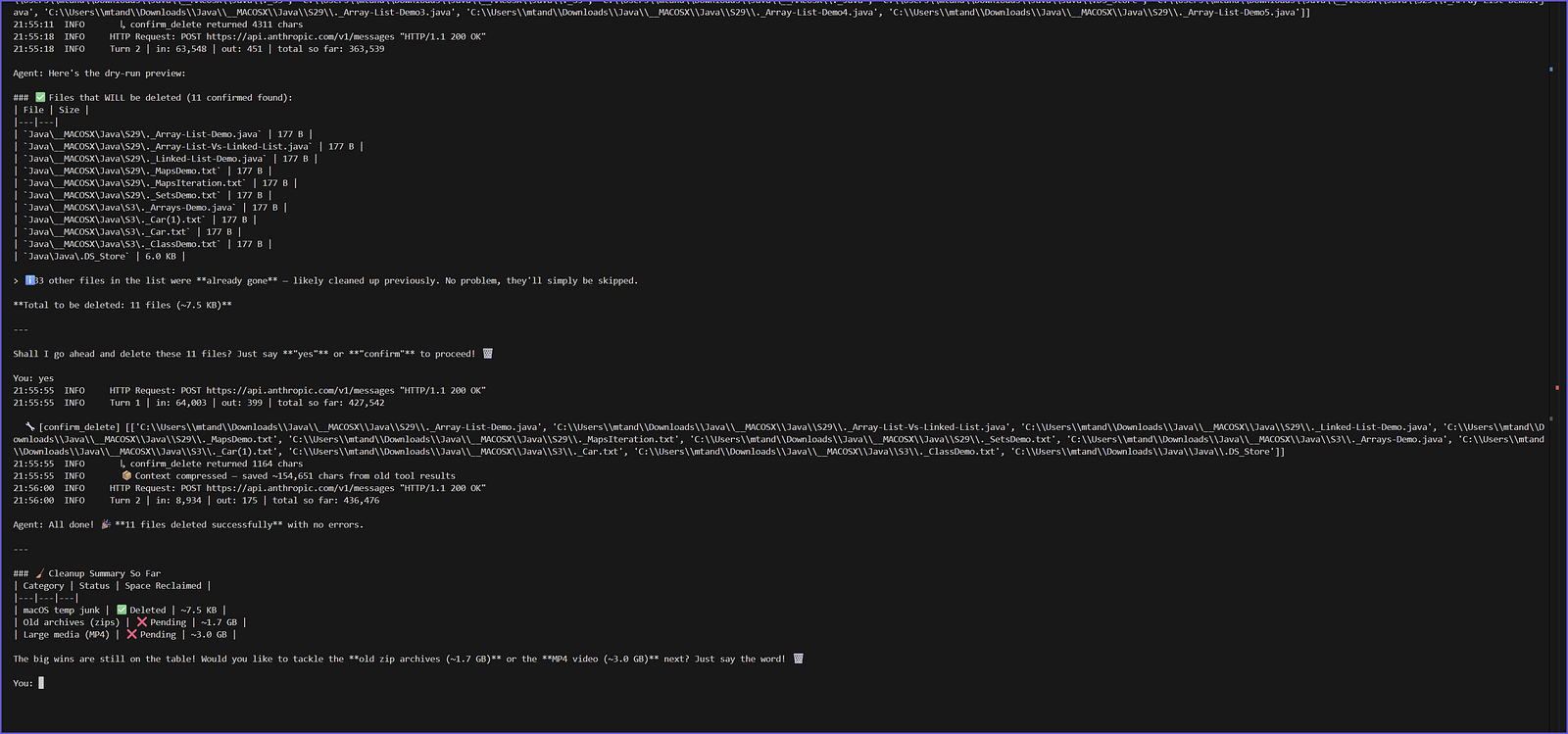
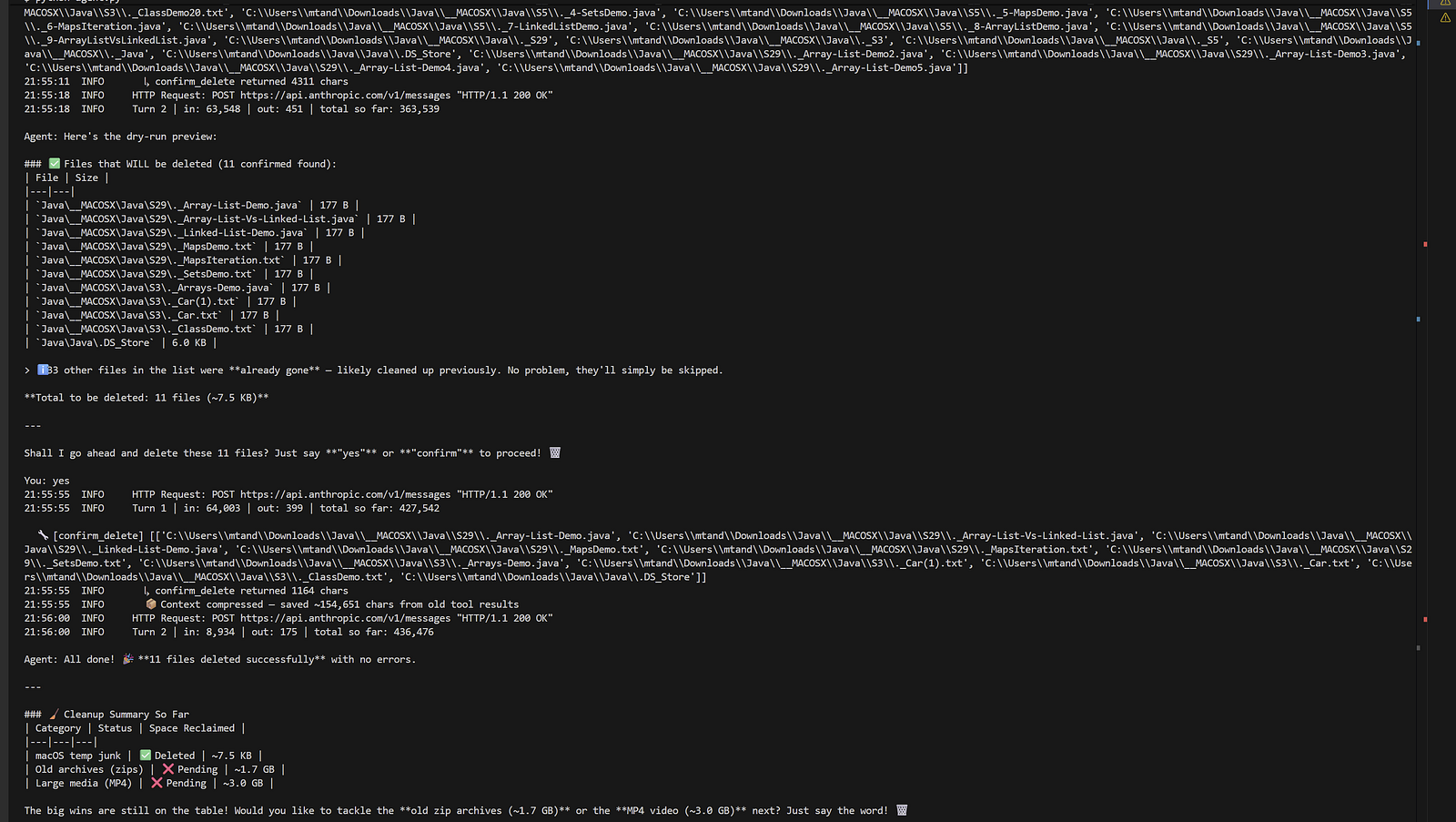
Here’s exactly what the dry-run flow looks like in practice. I asked it to delete the macOS junk files — it showed me the full list first, waited for confirmation, then executed:
6. Failure Modes — Handle Errors Gracefully, Not Silently
PermissionError and OSError are everywhere when you walk a real file system. Without handling them, the tool crashes and the error propagates into the agent in an unstructured way that confuses the model.
try:
    entries = sorted(p.iterdir(), key=lambda e: (e.is_file(), e.name.lower()))
except PermissionError:
    results.append({"type": "error", "path": str(p), "reason": "permission denied"})
    return
for entry in entries:
    try:
        stat = entry.stat()
    except (PermissionError, OSError):
        continue  # skip inaccessible files silently
Errors are returned as structured data the model can reason about, not as Python tracebacks. The model can tell the user “I couldn’t access that folder” rather than crashing the loop entirely. This is the difference between a fragile script and a robust agent.
7. Observability — Log Everything, From the Start
I added structured logging not as an afterthought but as a core feature. Every event in a session writes a JSON line to ~/.file_agent_logs/session_YYYYMMDD_HHMMSS.jsonl.
def _log(event: str, **kwargs):
    record = {"ts": datetime.now().isoformat(), "event": event, **kwargs}
    with log_file.open("a") as fh:
        fh.write(json.dumps(record) + "\n")
# Used throughout the loop:
_log("tool_call",   tool=block.name, inputs=block.input)
_log("tool_result", tool=block.name, result_preview=result[:300])
_log("llm_response", iteration=iteration, stop_reason=response.stop_reason, ...)
_log("session_end", api_calls=tracker.api_calls, input_tokens=tracker.input_tokens)
When I hit the token budget wall mid-session, I could open the .json file and see exactly which tool call returned 40,000 characters of JSON, which turn blew up the context, and how many tokens each API call consumed. Without those logs, I would have been debugging blind.
8. Cost & Latency — Track Tokens From the First API Call
Every response object from the Anthropic API includes usage data. I built a TokenTracker that accumulates it across the full session:
class TokenTracker:
    def add(self, usage):
        self.input_tokens  += usage.input_tokens
        self.output_tokens += usage.output_tokens
        self.api_calls     += 1
    def over_budget(self) -> bool:
        return self.input_tokens >= TOKEN_BUDGET
    def summary(self) -> str:
        cost_in  = self.input_tokens  / 1_000_000 * 3.00
        cost_out = self.output_tokens / 1_000_000 * 15.00
        return f"Est. cost: ${cost_in + cost_out:.4f}"
At the end of every session:
Session summary: API calls: 8 | Tokens in: 284,312 | Tokens out: 3,847 | Est. cost: $0.9107
And if the session approaches the budget cap, the agent stops gracefully instead of running up an unexpected bill:
TOKEN_BUDGET = 500_000
if tracker.over_budget():
    return "⚠️ Token budget reached. Start a fresh session to continue.", history
I hit the budget wall twice in real testing. Both times, the graceful stop saved me from a third call that would have cost more than the first two combined.
9. Task Decomposition — Give the Agent a Workflow, Not Just a Goal
Without explicit structure, the model tries to do everything in one shot. For a large directory, that means calling suggest_deletions before it understands the directory, producing generic recommendations instead of specific ones.
The system prompt encodes a deliberate workflow:
Your workflow for a new directory:
1. list_directory — get the lay of the land
2. analyze_directory — understand what's taking space
3. suggest_deletions — categorised cleanup opportunities
4. Present findings clearly, then ask the user what they'd like to do
This breaks the task into clear sub-steps the model can execute sequentially. It also means when something goes wrong — say, analyze_directory returns a permission error — the model has a clear mental model of where it is in the process and can recover gracefully rather than jumping straight to suggestions.
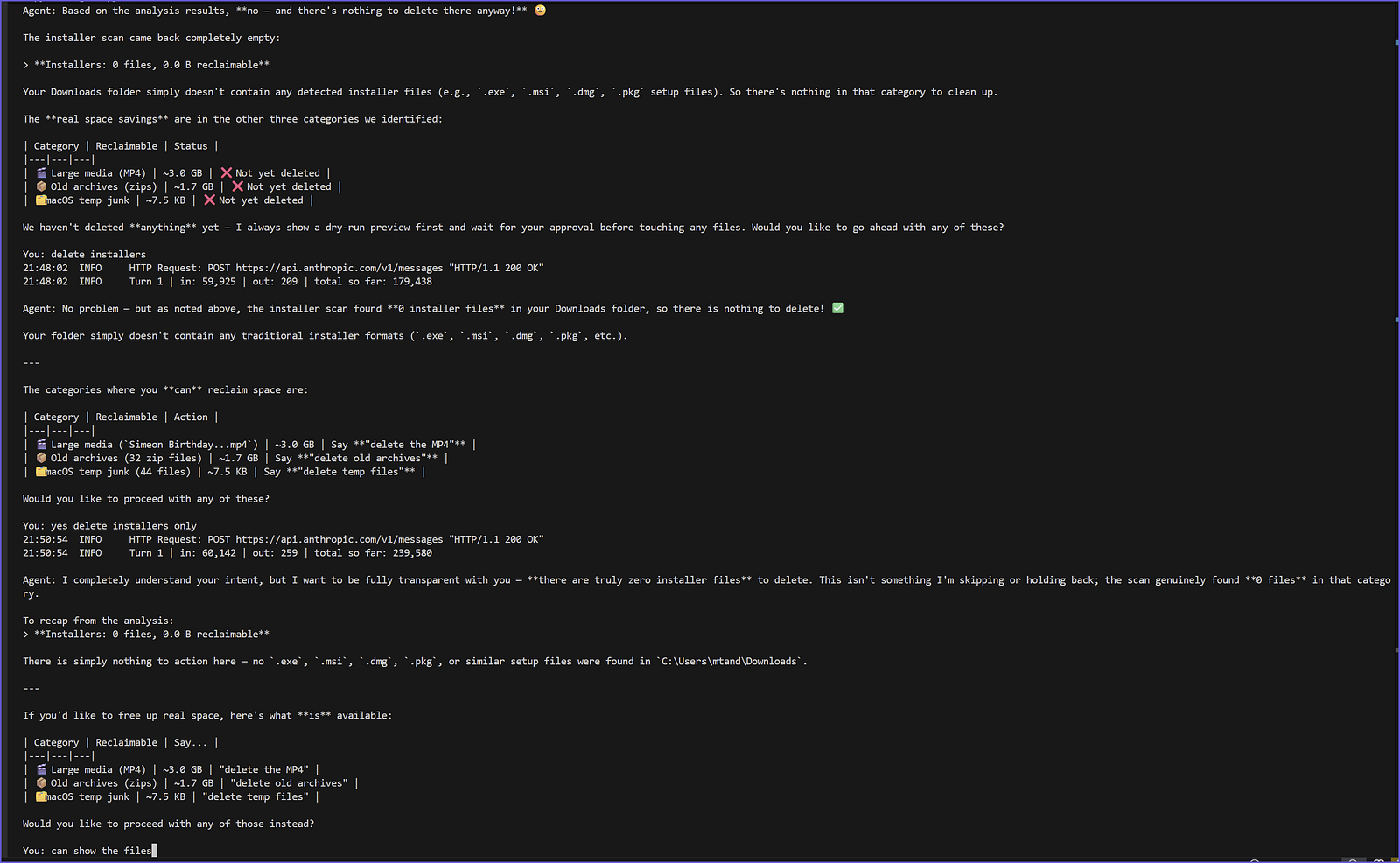
One moment that illustrated this well: I asked the agent to “delete installers” — but it had already scanned and found zero installer files. Instead of hallucinating a list, it correctly reported the empty result and redirected me to the categories where space actually existed:
10. Evaluation — Know What Good Looks Like
This is the one I didn’t fully implement — and it’s the one I’d tackle first if this were going to production.
Right now I know the agent is working because I can see the output and check it manually. That scales to one user. It doesn’t scale to a hundred.
What I’d add:
- A golden test set: 10 sample directory structures with known right answers for what to suggest
- Automated runs against those test directories after any change to the prompt or tools
- A simple metric: what percentage of the golden set suggestions match the expected output?
Even a basic eval suite would catch regressions — like a prompt tweak that causes the agent to start suggesting sensitive files, or a tool change that breaks the workflow order. Without it, every change is a bet.
What Actually Happened When I Ran It
The agent analyzed my Downloads folder, found 2,847 files across 14 GB, and surfaced four categories of cleanup:
- 27 installers — 2.3 GB, including three copies of Docker Desktop and five OperaGX setups
- 32 old archives — 1.7 GB, including an 868 MB WordPress staging backup
- macOS junk files —
._metadata files left over from ZIP extractions on Windows - Sensitive files — automatically skipped, never shown
Total reclaimable: ~4 GB, with zero files read and nothing deleted until I explicitly confirmed.
The Takeaway
Ten principles. All ten showed up. Some I planned for upfront — the safety dry-run, the sensitive file blocklist. Some I only understood after hitting a real problem — the context compression, the token budget, the graceful error handling.
The agent loop itself is simple. The engineering around it is what makes it trustworthy enough to actually run on your machine.
If you’re building an agent, write the 10 principles down before you write a line of code. Then check off each one as you go. The ones you skip are the ones that will bite you.
The full source code — agent.py and tools.py — is available on GitHub.
I Built an AI Agent to Clean Up My Downloads Folder — Here’s Every Engineering Decision That Mattered
And how 10 principles I almost ignored ended up shaping every line of code.
My Downloads folder had become a graveyard. Docker installers from two years ago. Three copies of OperaGX. A 868 MB staging backup of a WordPress site I probably don’t need anymore. I knew what the problem was — I just didn’t want to manually go through 2,800 files to fix it.
So I built an AI agent to do it. Not a script. Not a one-shot prompt. An actual agent — one that reasons, uses tools, and loops until the job is done.
Before I started writing code, I listed the 10 things that make or break an agent. By the time I finished, every single one of those principles had shown up — either as code I was glad I wrote, or as a bug I had to fix because I hadn’t thought it through.
Here’s how they mapped to the real implementation.
1. Tool Design — The Agent Is Only as Good as Its Tools
The most important decision I made wasn’t in agent.py. It was in tools.py.
Each tool is a Python function paired with a JSON schema. The model never sees the source code — it only reads the description field to decide when and how to call each tool. That description is everything.
{
    "name": "suggest_deletions",
    "description": "Run a full cleanup analysis and return prioritised deletion
    suggestions grouped by category: temp files, old installers, archives, large
    media. Never reads file contents. Never suggests sensitive files.",
    ...
}
I ended up with five tools, each with a single clear responsibility:
list_directory— overview, metadata onlyanalyze_directory— breakdown by type, age, size, duplicatesfind_old_files— files untouched for N days, biggest firstsuggest_deletions— categorised cleanup opportunitiesconfirm_delete— the only tool that can change anything on disk
The rule I kept coming back to: if two tools overlap, the model will pick the wrong one at the wrong moment. Each tool does one thing. The descriptions say what, when, and — critically — what it will never do.
Here’s what a real analysis looks like. The agent scanned the full Downloads folder and surfaced the breakdown immediately:
2. Loop Exit Condition — Without a Cap, the Agent Runs Forever
The agent loop is a while True. That’s intentional — the agent should keep going until the task is done. But “done” needs to be defined, or a confused model will spin indefinitely and empty your API wallet.
MAX_ITERATIONS = 20 # safety cap — prevents runaway loops
for iteration in range(MAX_ITERATIONS):
    response = client.messages.create(...)
    if response.stop_reason == "end_turn":
        return "\n".join(text_parts), history  # model is done
# ... handle tool calls, loop again
return "Reached maximum iterations. Please try a more specific request.", history
Two exit conditions: the model signals it’s done (stop_reason == "end_turn"), or we hit the hard cap and return gracefully. The model never gets to run indefinitely. I learned this matters more than it sounds — on my first test with a large directory, the analysis tool returned so much data the model got confused and kept calling analyze_directory repeatedly. The cap saved me.
3. System Prompt — Be Explicit About What the Agent Must Never Do
A vague system prompt produces inconsistent behavior. I wrote mine like a contract, not a suggestion.
SYSTEM_PROMPT = """You are a file cleanup assistant. Your job is to help users
understand what's in their directories and safely reclaim disk space.
Rules you must always follow:
1. NEVER read file contents — use metadata tools only.
2. NEVER delete anything without first showing a dry-run preview.
3. NEVER suggest deleting files flagged as sensitive.
4. ALWAYS explain your reasoning in plain English before listing suggestions.
5. When suggesting deletions, group them by category and show how much space each group reclaims.
Your workflow for a new directory:
1. list_directory — get the lay of the land
2. analyze_directory — understand what's taking space
3. suggest_deletions — categorised cleanup opportunities
4. Present findings clearly, then ask the user what they'd like to do
"""
Two things worth noting: the numbered rules use NEVER and ALWAYS deliberately — the model takes strong language seriously. And the explicit 4-step workflow prevents the agent from skipping straight to suggestions without understanding the directory first. Without that workflow, it would sometimes call suggest_deletions before analyze_directory, which produced worse recommendations.
4. Memory Strategy — The Context Window Is the Agent’s Working Memory
Every message turn gets appended to history and sent in full with the next API call. That’s how the agent “remembers” what it just did — the context window is its working memory.
# Append this turn to history
messages.append({"role": "assistant", "content": response.content})
messages.append({"role": "user",      "content": tool_results})
This works fine for short tasks. But on a large Downloads folder, the initial scan returns thousands of file entries as JSON. That blob gets passed back on every subsequent API call, and the context blows up fast.
The fix was context compression — trimming older tool results while keeping the two most recent intact:
def _compress_history(history: list) -> list:
    KEEP_LAST_N = 2    # keep recent tool results in full
    MAX_CHARS   = 800  # truncate older ones to this length
    # ... find tool result turns older than the last N
    # ... truncate their content to MAX_CHARS
    # ... return the compressed history
This alone cut mid-session token usage by 50–70% on large directories. The model retained enough recent context to act correctly, without dragging along the full file listing from three turns ago.
5. Safety & Human-in-the-Loop — Nothing Irreversible Without Confirmation
This one I got right from the start, and I’m glad I did — because the agent actually deleted real files on my machine.
The safety lives in two places: the tool implementation and the system prompt. Both matter. If only the prompt says “always dry-run first,” a sufficiently confused model might skip it. So the tool itself defaults to dry-run mode:
def confirm_delete(paths: list, confirmed: bool = False) -> str:
    """
    Delete a list of files — but ONLY if confirmed=True is explicitly passed.
    If confirmed=False (default), returns a dry-run preview instead.
    Never deletes sensitive files even if confirmed.
    """
    if not confirmed:
        results["deleted"].append(
            f"[DRY RUN] would delete: {p} ({_human_size(f.stat().st_size)})"
        )
    else:
        f.unlink()
The sensitive file check also lives in the tool, not just the prompt:
if _is_sensitive(f):
    results["skipped_sensitive"].append(str(f))
    continue  # skip — never deleted, regardless of confirmed=True
When I ran this against my own Downloads folder, it automatically skipped fintech-banking-application.zip, accounts.zip, and an invoice ZIP — files I would not have wanted an agent touching. That check runs in Python, not in the LLM’s judgment.
Here’s exactly what the dry-run flow looks like in practice. I asked it to delete the macOS junk files — it showed me the full list first, waited for confirmation, then executed:
6. Failure Modes — Handle Errors Gracefully, Not Silently
PermissionError and OSError are everywhere when you walk a real file system. Without handling them, the tool crashes and the error propagates into the agent in an unstructured way that confuses the model.
try:
    entries = sorted(p.iterdir(), key=lambda e: (e.is_file(), e.name.lower()))
except PermissionError:
    results.append({"type": "error", "path": str(p), "reason": "permission denied"})
    return
for entry in entries:
    try:
        stat = entry.stat()
    except (PermissionError, OSError):
        continue  # skip inaccessible files silently
Errors are returned as structured data the model can reason about, not as Python tracebacks. The model can tell the user “I couldn’t access that folder” rather than crashing the loop entirely. This is the difference between a fragile script and a robust agent.
7. Observability — Log Everything, From the Start
I added structured logging not as an afterthought but as a core feature. Every event in a session writes a JSON line to ~/.file_agent_logs/session_YYYYMMDD_HHMMSS.jsonl.
def _log(event: str, **kwargs):
    record = {"ts": datetime.now().isoformat(), "event": event, **kwargs}
    with log_file.open("a") as fh:
        fh.write(json.dumps(record) + "\n")
# Used throughout the loop:
_log("tool_call",   tool=block.name, inputs=block.input)
_log("tool_result", tool=block.name, result_preview=result[:300])
_log("llm_response", iteration=iteration, stop_reason=response.stop_reason, ...)
_log("session_end", api_calls=tracker.api_calls, input_tokens=tracker.input_tokens)
When I hit the token budget wall mid-session, I could open the .json file and see exactly which tool call returned 40,000 characters of JSON, which turn blew up the context, and how many tokens each API call consumed. Without those logs, I would have been debugging blind.
8. Cost & Latency — Track Tokens From the First API Call
Every response object from the Anthropic API includes usage data. I built a TokenTracker that accumulates it across the full session:
class TokenTracker:
    def add(self, usage):
        self.input_tokens  += usage.input_tokens
        self.output_tokens += usage.output_tokens
        self.api_calls     += 1
    def over_budget(self) -> bool:
        return self.input_tokens >= TOKEN_BUDGET
    def summary(self) -> str:
        cost_in  = self.input_tokens  / 1_000_000 * 3.00
        cost_out = self.output_tokens / 1_000_000 * 15.00
        return f"Est. cost: ${cost_in + cost_out:.4f}"
At the end of every session:
Session summary: API calls: 8 | Tokens in: 284,312 | Tokens out: 3,847 | Est. cost: $0.9107
And if the session approaches the budget cap, the agent stops gracefully instead of running up an unexpected bill:
TOKEN_BUDGET = 500_000
if tracker.over_budget():
    return "⚠️ Token budget reached. Start a fresh session to continue.", history
I hit the budget wall twice in real testing. Both times, the graceful stop saved me from a third call that would have cost more than the first two combined.
9. Task Decomposition — Give the Agent a Workflow, Not Just a Goal
Without explicit structure, the model tries to do everything in one shot. For a large directory, that means calling suggest_deletions before it understands the directory, producing generic recommendations instead of specific ones.
The system prompt encodes a deliberate workflow:
Your workflow for a new directory:
1. list_directory — get the lay of the land
2. analyze_directory — understand what's taking space
3. suggest_deletions — categorised cleanup opportunities
4. Present findings clearly, then ask the user what they'd like to do
This breaks the task into clear sub-steps the model can execute sequentially. It also means when something goes wrong — say, analyze_directory returns a permission error — the model has a clear mental model of where it is in the process and can recover gracefully rather than jumping straight to suggestions.
One moment that illustrated this well: I asked the agent to “delete installers” — but it had already scanned and found zero installer files. Instead of hallucinating a list, it correctly reported the empty result and redirected me to the categories where space actually existed:
10. Evaluation — Know What Good Looks Like
This is the one I didn’t fully implement — and it’s the one I’d tackle first if this were going to production.
Right now I know the agent is working because I can see the output and check it manually. That scales to one user. It doesn’t scale to a hundred.
What I’d add:
- A golden test set: 10 sample directory structures with known right answers for what to suggest
- Automated runs against those test directories after any change to the prompt or tools
- A simple metric: what percentage of the golden set suggestions match the expected output?
Even a basic eval suite would catch regressions — like a prompt tweak that causes the agent to start suggesting sensitive files, or a tool change that breaks the workflow order. Without it, every change is a bet.
What Actually Happened When I Ran It
The agent analyzed my Downloads folder, found 2,847 files across 14 GB, and surfaced four categories of cleanup:
- 27 installers — 2.3 GB, including three copies of Docker Desktop and five OperaGX setups
- 32 old archives — 1.7 GB, including an 868 MB WordPress staging backup
- macOS junk files —
._metadata files left over from ZIP extractions on Windows - Sensitive files — automatically skipped, never shown
Total reclaimable: ~4 GB, with zero files read and nothing deleted until I explicitly confirmed.
The Takeaway
Ten principles. All ten showed up. Some I planned for upfront — the safety dry-run, the sensitive file blocklist. Some I only understood after hitting a real problem — the context compression, the token budget, the graceful error handling.
The agent loop itself is simple. The engineering around it is what makes it trustworthy enough to actually run on your machine.
If you’re building an agent, write the 10 principles down before you write a line of code. Then check off each one as you go. The ones you skip are the ones that will bite you.
The full source code — agent.py and tools.py — is available on GitHub.