A reference deployment that shows the pieces most “getting started with ECS” tutorials skip: locking CloudFront to your ALB, dual-layer autoscaling, and a bastion-only path into your compute.
Most ECS tutorials reach for Fargate and stop there — no servers to manage, nothing to learn about capacity. That’s a fine default in production, but it also hides a lot of what’s actually happening underneath: how ECS places tasks on hosts, how a Capacity Provider ties an Auto Scaling Group to a cluster, how you keep your load balancer from being hit directly instead of through your CDN.
I built nextJS-application-on-Amazon-ECS-EC2-lauched-type to work through those pieces deliberately: a small Next.js app, containerized, deployed to ECS on EC2 container instances, provisioned entirely with Terraform, sitting behind CloudFront and an ALB, with a bastion host as the only door into the private network.
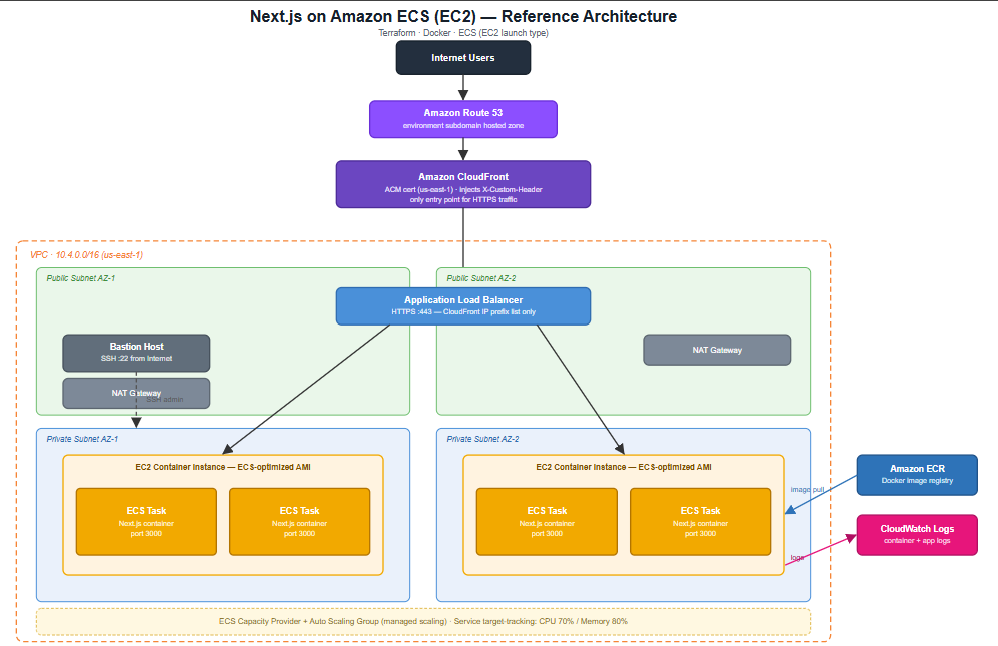
Here’s the architecture, and the handful of decisions in it that are worth explaining.
Why EC2 launch type, not Fargate
Fargate abstracts away the compute layer entirely. That’s useful in production, but it also means you never have to think about:
- How EC2 instances actually join an ECS cluster (the ECS agent, the
amzn2-ami-ecs-hvm-*AMI, theecs_cluster_namebaked into user data) - How a Capacity Provider links an Auto Scaling Group to a cluster and manages instance count via
managed_scaling, separately from how many tasks the service wants running - How task placement strategies (
spreadacross AZs, thenbinpackon memory) actually affect where your containers land
Building it on EC2 forces you to wire all of that up by hand, which is exactly the point.
The traffic path, and why the ALB refuses direct traffic
Route 53 (environment subdomain) → CloudFront → ALB → ECS tasks on EC2 (private subnets)
The interesting design decision isn’t the happy path — it’s what happens if someone finds your ALB’s DNS name and tries to hit it directly, skipping CloudFront. Two things stop that:
1. A security group rule that only trusts CloudFront’s IP ranges.
data "aws_ec2_managed_prefix_list" "cloudfront" {
  name = "com.amazonaws.global.cloudfront.origin-facing"
}

resource "aws_security_group_rule" "alb_cloudfront_https_ingress_only" {
  security_group_id = aws_security_group.alb.id
  description       = "Allow HTTPS access only from CloudFront CIDR blocks"
  from_port         = 443
  protocol          = "tcp"
  prefix_list_ids   = [data.aws_ec2_managed_prefix_list.cloudfront.id]
  to_port           = 443
  type              = "ingress"
}
2. A custom header, injected by CloudFront and checked by the ALB listener rule, that a random client can’t forge.
resource "aws_alb_listener" "alb_default_listener_https" {
  # ...
  default_action {
    type = "fixed-response"
    fixed_response {
      content_type = "text/plain"
      message_body = "Access denied"
      status_code  = "403"
    }
  }
}

resource "aws_alb_listener_rule" "https_listener_rule" {
  listener_arn = aws_alb_listener.alb_default_listener_https.arn

  action {
    type             = "forward"
    target_group_arn = aws_alb_target_group.service_target_group.arn
  }

  condition {
    http_header {
      http_header_name = "X-Custom-Header"
      values           = [var.custom_origin_host_header]
    }
  }
}
The listener’s default action is a 403. Only requests carrying the right header — set by CloudFront’s origin config, invisible to anyone hitting the ALB directly — get forwarded anywhere. IP allow-listing plus a shared-secret header is a common pattern for enforcing “traffic must come through the CDN,” and it’s cheap to set up.
Compute lives in private subnets; the bastion is the only way in
ECS container instances sit in private subnets across two AZs, reachable from the ALB only on ephemeral ports via a security-group-to-security-group rule — no CIDR ranges involved:
ingress {
  description     = "Allow ingress traffic from ALB on HTTP on ephemeral ports"
  from_port       = 1024
  to_port         = 65535
  protocol        = "tcp"
  security_groups = [aws_security_group.alb.id]
}
The only SSH path in is a bastion host in a public subnet, and the instance security group only trusts SSH from that bastion’s security group — not from the internet. NAT gateways (one per AZ) give the private instances outbound internet access for pulling images and shipping logs, without exposing them to inbound traffic.
Two autoscaling layers, not one
It’s easy to autoscale tasks and forget you also need to autoscale the hosts those tasks run on. This stack has both, and they’re deliberately separate:
- Service-level target tracking — scales the ECS service’s desired task count based on average CPU (70%) and memory (80%) across the service.
- Capacity-provider managed scaling — scales the underlying Auto Scaling Group so there’s always enough EC2 capacity for the tasks the service wants to place, with
managed_termination_protectionenabled so the ASG won’t kill an instance mid-task.
If you only wire up the first one, your service can decide it wants five tasks and have nowhere to put them.
Deploying: Terraform, Docker, and a hand-rolled version tag
There’s no CI/CD pipeline here on purpose — deploy.sh simulates what one would do:
HASH=$(openssl rand -hex 12)

terraform init
terraform plan -var hash=${HASH} -out=infrastructure.tf.plan
terraform apply -auto-approve infrastructure.tf.plan

REPOSITORY_URL=$(terraform output -raw ecr_repository_url)
docker build --platform linux/amd64 -t nexgeneerz/$1 ../app
docker tag nexgeneerz/$1:latest ${REPOSITORY_URL}:${HASH}
docker push ${REPOSITORY_URL}:${HASH}
Every deploy generates a random hash, tags the image with it, and passes the same hash into Terraform as var.hash — so the ECS task definition always points at the exact image that was just pushed, instead of racing against a mutable :latest tag. It’s a stand-in for what a real CI system’s build ID would do.
The whole thing is wrapped in a Makefile so the workflow is just:
make bootstrap   # copy .env.example → .env, fill in AWS creds + domain
make deploy      # terraform apply + docker build/push
make destroy     # drain the ECS service, then terraform destroy
A couple of things that bit me
- ACM certificates for CloudFront must live in
us-east-1, regardless of what region the rest of your stack is in. This stack provisions two separate certificates — one in the deploy region for the ALB, one inus-east-1for CloudFront — using an aliased second AWS provider block. - Route 53 needs a zone per environment, not just per domain, if you want each environment (
dev,staging, …) to have its own delegated subdomain. That means an NS delegation record from the root zone into the environment zone, in addition to the usual TLD → root delegation. - Never commit the keypair. It’s obvious in hindsight, but it’s worth automating: the EC2 key pair’s public key is a Terraform variable sourced from
.env, not a literal string in.tf— so there’s nothing identity-bearing to accidentally commit, and the private key file itself is gitignored from day one.
Try it
The full stack — Terraform, Dockerfiles, the Makefile, and the Next.js app — is on GitHub:
redcell-io/nextJS-application-on-Amazon-ECS-EC2-lauched-type
make bootstrap, fill in a domain you control and a Route 53 hosted zone ID, and make deploy.